
Confused Mel Gibson Meme Generator
Create Your Confused Mel Gibson Meme
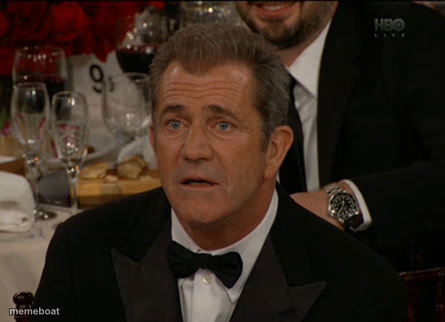
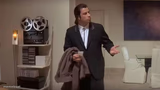
Mel Gibson's baffled, mid-sentence face at a fancy dinner event — pure 'wait, what?' energy. Caption it free, no sign-up required.
Blank Confused Mel Gibson meme template
Download the blank Confused Mel Gibson template to caption it yourself, or add your text right here in the editor above and download the finished meme.
When to use the Confused Mel Gibson meme
- Hearing a plot twist that makes no sense
- Someone at a fancy event says something bizarre
- Processing shocking news mid-sip of wine
- Reacting to a rule change nobody explained
Confused Mel Gibson template facts
- Featuring
- Mel Gibson
- Dimensions
- 445 × 322 px
- Format
- JPG
- Added
- 2025
About the Confused Mel Gibson meme template
That split-second face you make at a black-tie event when someone says something so unhinged you have to physically process it before responding. Mel Gibson, mouth half-open, eyes squinting like the universe just glitched.
Use it for any moment of pure confusion — plot twists, bizarre small talk, or hearing news that makes zero sense the first time.
Templates similar to Confused Mel Gibson



Confused Mel Gibson meme FAQ
How do I make a Confused Mel Gibson meme?
Scroll up to the Confused Mel Gibson template, add your own text boxes in the editor above and type your captions, adjust the font, size and color if you like, then click download. Your finished Confused Mel Gibson meme is ready to share in seconds.
Can I use the Confused Mel Gibson template for free?
Yes. The Confused Mel Gibson template is completely free to use — no signup and no limits on how many memes you create or where you share them.
How do I download my Confused Mel Gibson meme?
Click the download button under the editor once your Confused Mel Gibson meme looks right. It saves straight to your device as a high-quality PNG or JPEG image.
How do I download the blank Confused Mel Gibson template?
Use the "Download blank template" button in the blank Confused Mel Gibson template section above to save the original, un-captioned image — handy if you'd rather caption it in another app or keep a copy.