
colon Meme Generator
Create Your colon Meme
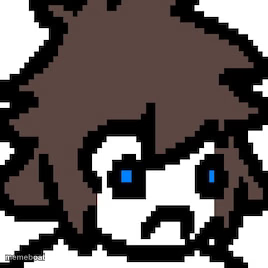
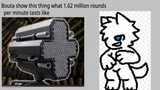
A scowling pixel-art character with messy brown hair and blue eyes glares at the camera. Perfect for annoyed reactions. Caption it free.
Blank colon meme template
Download the blank colon template to caption it yourself, or add your text right here in the editor above and download the finished meme.
When to use the colon meme
- Reacting to someone's terrible take in a group chat
- The face you make when your code breaks five minutes before a demo
- Staring down a Monday morning notification pile
- When someone says 'it's just a small fix' and it absolutely is not
colon template facts
- Dimensions
- 268 × 268 px
- Format
- JPG
- Text boxes
- 2
- Added
- 2025
About the colon meme template
This blocky little pixel-art face has one job: looking done with your nonsense. Spiky brown hair, arched brow, tiny blue eyes narrowed into a scowl — it's the digital equivalent of a heavy sigh before someone says something petty.
Use it whenever words fail and a judgmental pixel stare says it better. Drop your own caption on top and it's ready to post in seconds, completely free, no login required.
Popular colon caption ideas
WHEN THE GROUP PROJECT · IS DUE IN 10 MINUTES
ME LOOKING AT MY BANK ACCOUNT · AFTER ONE COFFEE ORDER
THAT FACE YOU MAKE · WHEN IT'S 'JUST A SMALL FIX'




colon meme FAQ
How do I make a colon meme?
Scroll up to the colon template, type your caption into the 2 text boxes in the editor above, adjust the font, size and color if you like, then click download. Your finished colon meme is ready to share in seconds.
Can I use the colon template for free?
Yes. The colon template is completely free to use — no signup and no limits on how many memes you create or where you share them.
How do I download my colon meme?
Click the download button under the editor once your colon meme looks right. It saves straight to your device as a high-quality PNG or JPEG image.
How do I download the blank colon template?
Use the "Download blank template" button in the blank colon template section above to save the original, un-captioned image — handy if you'd rather caption it in another app or keep a copy.