
Craig Crying Meme Generator
Create Your Craig Crying Meme
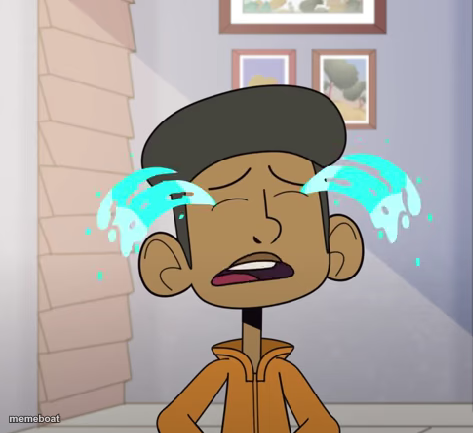
Craig from Craig of the Creek bawling with cartoon tear streams — the go-to reaction for total emotional devastation. Caption it free.
Blank Craig Crying meme template
Download the blank Craig Crying template to caption it yourself, or add your text right here in the editor above and download the finished meme.
When to use the Craig Crying meme
- Finding out the store is out of your favorite snack
- Getting benched right before the big game
- Realizing you left your charger at home
- Any minor inconvenience that feels like the end of the world
Craig Crying template facts
- Featuring
- Craig (Craig of the Creek)
- Dimensions
- 473 × 433 px
- Format
- PNG
- Text boxes
- 1
- Added
- 2025
About the Craig Crying meme template
Full ugly-cry mode: eyes squeezed shut, mouth open, big cartoon tear streaks flying off both cheeks. This kid is not okay, and honestly relatable for anyone who's had a really bad day.
Use it for disappointment, heartbreak, or straight-up losing it over something minor but devastating in the moment.
Popular Craig Crying caption ideas
YAYAYAYAYAYAYAAAAAAAA · IM GONNA KISCK THIS DUCKOUSE DOWN!!!!!!
THEY SAID NO MORE FRIES
Templates similar to Craig Crying


Craig Crying meme FAQ
How do I make a Craig Crying meme?
Scroll up to the Craig Crying template, type your caption into the text box in the editor above, adjust the font, size and color if you like, then click download. Your finished Craig Crying meme is ready to share in seconds.
Can I use the Craig Crying template for free?
Yes. The Craig Crying template is completely free to use — no signup and no limits on how many memes you create or where you share them.
How do I download my Craig Crying meme?
Click the download button under the editor once your Craig Crying meme looks right. It saves straight to your device as a high-quality PNG or JPEG image.
How do I download the blank Craig Crying template?
Use the "Download blank template" button in the blank Craig Crying template section above to save the original, un-captioned image — handy if you'd rather caption it in another app or keep a copy.