
Cat Holds Dog Hostage Meme Generator
Create Your Cat Holds Dog Hostage Meme

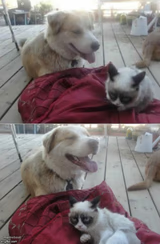
A cat pressing a knife to a very calm dog's neck in this absurd hostage-standoff photo. Perfect for over-the-top sibling rivalry or pet drama jokes — caption it free.
Blank Cat Holds Dog Hostage meme template
Download the blank Cat Holds Dog Hostage template to caption it yourself, or add your text right here in the editor above and download the finished meme.
When to use the Cat Holds Dog Hostage meme
- Sibling arguments that escalate over absolutely nothing
- Two coworkers 'fighting' over the last office chair
- Pets pretending to be enemies but secretly best friends
Cat Holds Dog Hostage template facts
- Dimensions
- 558 × 447 px
- Format
- JPG
- Added
- 2025
About the Cat Holds Dog Hostage meme template
A cat, clearly the mastermind here, holding a knife against a dog's throat while the dog just... lies there, completely unbothered. Nobody knows how this photo happened and honestly nobody should ask.
It's the ultimate exaggeration template — for pet rivalries, sibling drama, or any situation where things have escalated way, way past what the actual stakes call for.
Templates similar to Cat Holds Dog Hostage



Cat Holds Dog Hostage meme FAQ
How do I make a Cat Holds Dog Hostage meme?
Scroll up to the Cat Holds Dog Hostage template, add your own text boxes in the editor above and type your captions, adjust the font, size and color if you like, then click download. Your finished Cat Holds Dog Hostage meme is ready to share in seconds.
Can I use the Cat Holds Dog Hostage template for free?
Yes. The Cat Holds Dog Hostage template is completely free to use — no signup and no limits on how many memes you create or where you share them.
How do I download my Cat Holds Dog Hostage meme?
Click the download button under the editor once your Cat Holds Dog Hostage meme looks right. It saves straight to your device as a high-quality PNG or JPEG image.
How do I download the blank Cat Holds Dog Hostage template?
Use the "Download blank template" button in the blank Cat Holds Dog Hostage template section above to save the original, un-captioned image — handy if you'd rather caption it in another app or keep a copy.