
Grumpy Cabbage Face Meme Generator
Create Your Grumpy Cabbage Face Meme
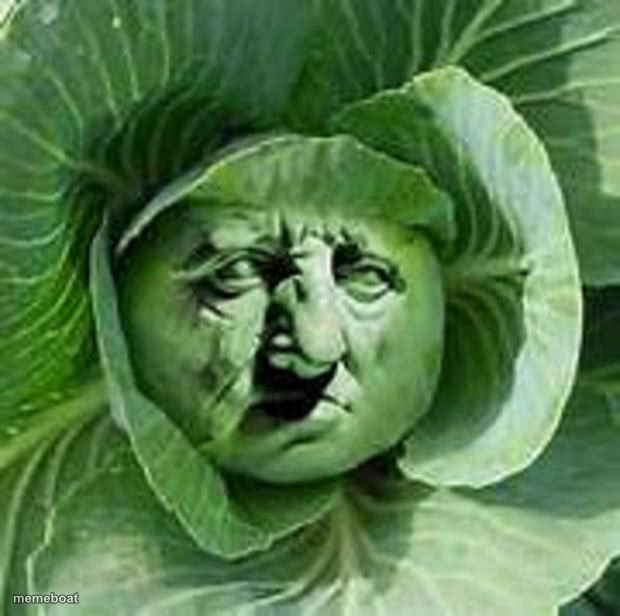
A cabbage with leaves arranged into an uncanny grumpy old-man face — perfect for tired, unimpressed, or "done with today" captions, free to caption.
Blank Grumpy Cabbage Face meme template
Download the blank Grumpy Cabbage Face template to caption it yourself, or add your text right here in the editor above and download the finished meme.
When to use the Grumpy Cabbage Face meme
- Reacting to bad news with maximum disapproval
- The face you make on a Monday morning before coffee
- Judging someone silently but very intensely
Grumpy Cabbage Face template facts
- Dimensions
- 620 × 616 px
- Format
- JPG
- Text boxes
- 1
- Added
- 2025
About the Grumpy Cabbage Face meme template
Somebody looked at a head of cabbage and saw a scowling old man staring back — deep-set eyes, a wrinkled scowl, leafy hair and all. It's pure pareidolia gold, equal parts hilarious and unsettling.
Use it for anything about being tired, judgmental, or fed up — this cabbage has clearly seen enough of your nonsense for one lifetime.
Popular Grumpy Cabbage Face caption ideas
me when someone says 'per my last email'
Templates similar to Grumpy Cabbage Face


Grumpy Cabbage Face meme FAQ
How do I make a Grumpy Cabbage Face meme?
Scroll up to the Grumpy Cabbage Face template, type your caption into the text box in the editor above, adjust the font, size and color if you like, then click download. Your finished Grumpy Cabbage Face meme is ready to share in seconds.
Can I use the Grumpy Cabbage Face template for free?
Yes. The Grumpy Cabbage Face template is completely free to use — no signup and no limits on how many memes you create or where you share them.
How do I download my Grumpy Cabbage Face meme?
Click the download button under the editor once your Grumpy Cabbage Face meme looks right. It saves straight to your device as a high-quality PNG or JPEG image.
How do I download the blank Grumpy Cabbage Face template?
Use the "Download blank template" button in the blank Grumpy Cabbage Face template section above to save the original, un-captioned image — handy if you'd rather caption it in another app or keep a copy.