
boom Meme Generator
Create Your boom Meme
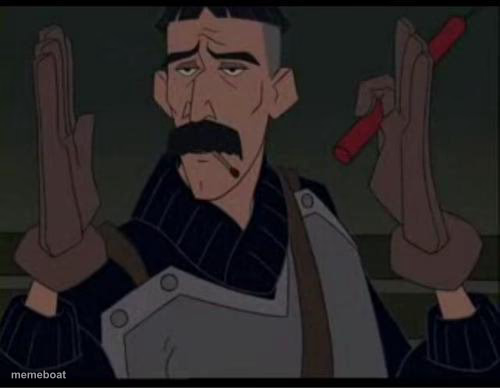
Mustached animated soldier grips two red rockets, one raised. Use for reckless plans, sketchy fixes, or 'this is either genius or an accident.' Free caption.
Blank boom meme template
Download the blank boom template to caption it yourself, or add your text right here in the editor above and download the finished meme.
When to use the boom meme
- when the fix for a small bug is 'just redeploy everything'
- holding two equally bad options and choosing violence
- the guy who says 'I got this' right before it gets worse
boom template facts
- Dimensions
- 500 × 388 px
- Format
- JPG
- Text boxes
- 2
- Added
- 2025
About the boom meme template
This gruff, mustached soldier from a wartime cartoon scene is holding two red rockets like he's about to solve a problem the fun way. One hand's up, one's steady, and his face says he's already made peace with whatever happens next.
Perfect for captioning moments where the 'solution' is clearly overkill, when someone volunteers for the dangerous job nobody asked for, or any time you're holding two bad ideas and about to pick both. Add your own text and download free.
Popular boom caption ideas
BOOM · NO MORE UPVOTES
ME WITH TWO ENERGY DRINKS · AT 2AM BEFORE THE DEADLINE
WHEN THE INTERN ASKS TO 'JUST TRY SOMETHING' · THIS IS FINE, PROBABLY
THE FIX FOR A TYPO IN PROD · REBUILD THE ENTIRE PIPELINE

boom meme FAQ
How do I make a boom meme?
Scroll up to the boom template, type your caption into the 2 text boxes in the editor above, adjust the font, size and color if you like, then click download. Your finished boom meme is ready to share in seconds.
Can I use the boom template for free?
Yes. The boom template is completely free to use — no signup and no limits on how many memes you create or where you share them.
How do I download my boom meme?
Click the download button under the editor once your boom meme looks right. It saves straight to your device as a high-quality PNG or JPEG image.
How do I download the blank boom template?
Use the "Download blank template" button in the blank boom template section above to save the original, un-captioned image — handy if you'd rather caption it in another app or keep a copy.