
Blind Bart Photographer Meme Generator
Create Your Blind Bart Photographer Meme
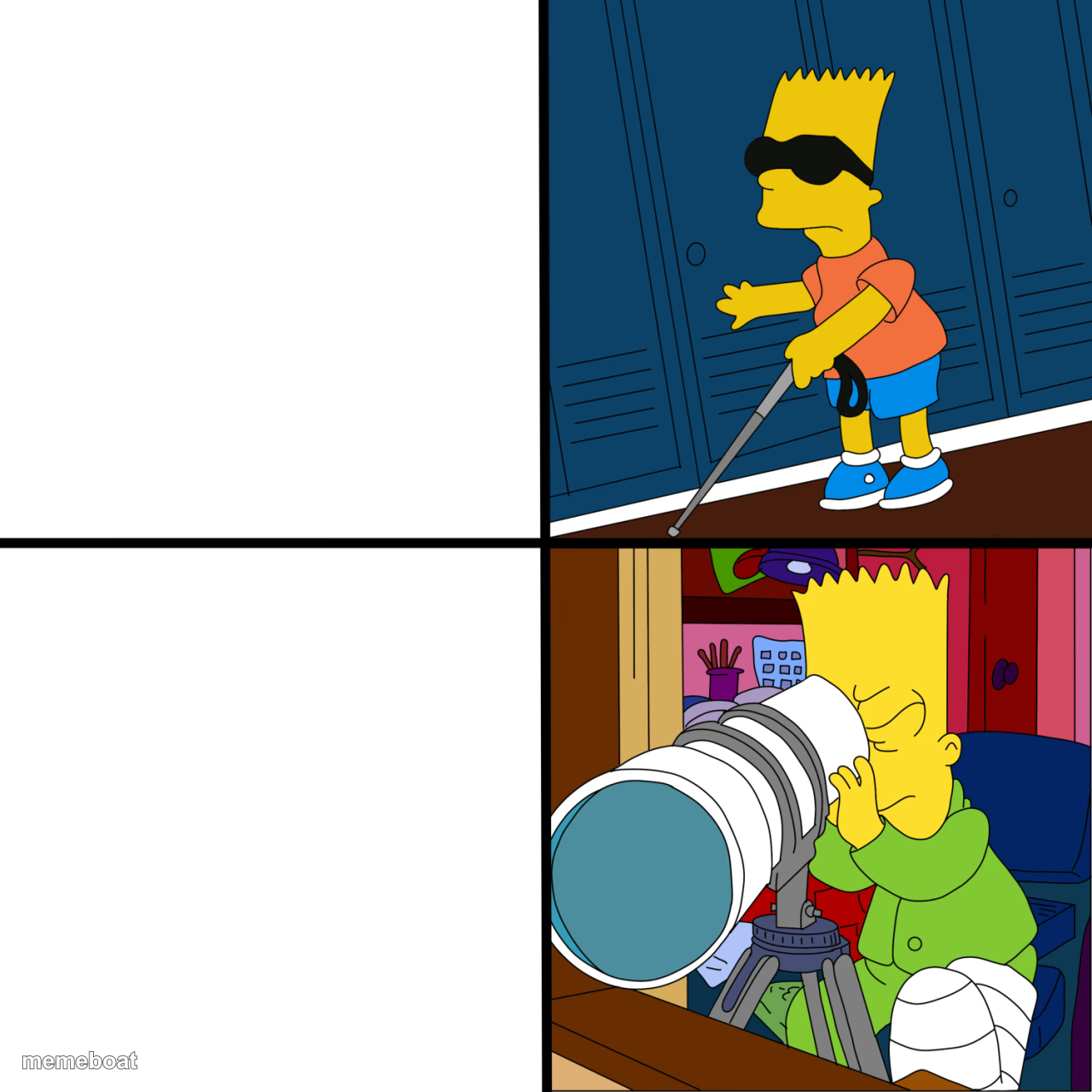
Also known as: Blind Bart · The Simpsons: Blind Bart vs. Bart Looking Through a Telescope · Bart Looking Through a Telescope · Bart Simpson · Blind Bart Telescope Binoculars Searching · Blind Bart vs. Bart Looking
Two-panel cartoon template: Bart Simpson walking with a cane wearing dark glasses on top, then peering intently through a giant camera lens below. Great for contradiction or 'plays blind but' jokes. Caption free.
Blank Blind Bart Photographer meme template
Download the blank Blind Bart Photographer template to caption it yourself, or add your text right here in the editor above and download the finished meme.
When to use the Blind Bart Photographer meme
- exposing a contradiction
- pretending to be one thing then acting different
- hypocrisy jokes
Blind Bart Photographer template facts
- Dimensions
- 1280 × 1280 px
- Format
- PNG
- Text boxes
- 2
- Added
- 2025
About the Blind Bart Photographer meme template
The Blind Bart meme template has become a standout in internet culture, capturing the imagination of meme enthusiasts worldwide. Originating from a viral clip shared on social media in 2021, this meme features the character Blind Bart, whose humorous and relatable expressions quickly sparked a viral phenomenon. As a general meme format, it taps into the rich tapestry of online humor and meme culture, making it a favorite for users looking to engage with trending content. Its rise on platforms like Twitter, Instagram, and TikTok highlights its cultural significance and enduring appeal.
Knowing how to use the Blind Bart meme template effectively can elevate your social media content and boost engagement. Perfect for funny reactions, relatable moments, and comedic storytelling, this meme is ideal for expressing surprise, confusion, or witty commentary. Whether you’re wondering how to make a Blind Bart meme or when to post it, this template fits seamlessly into conversations and posts that thrive on humor and entertainment. Use it to connect with your audience by tapping into viral phenomena and online trends that resonate across Facebook, Instagram, and Twitter.
The Blind Bart meme remains popular because it’s incredibly easy to create and customize, even without design skills. With our Blind Bart meme generator, you can instantly generate personalized memes by adding your own text and captions, making your content both unique and shareable. This quick and free meme maker delivers instant results, empowering you to build viral content that stands out in the crowded social media landscape. Don’t wait—create your Blind Bart meme now and join millions who are making hilarious, trending memes that get laughs and shares worldwide.
Popular Blind Bart Photographer caption ideas
YouTube checking any innapropriate content in ads · YouTube when someone swears
Claims he can't see the board · Zooms in on her Instagram story
Says he never checks his ex's page · Screenshots it in 4K
Too tired to do chores · Spots a typo from across the room
LALIGA WHEN OTHER 18 CLUBS SLIP · LALIGA WHEN BARCELONA AND REAL MADRID SLIP
Templates similar to Blind Bart Photographer



Blind Bart Photographer meme FAQ
How do I make a Blind Bart Photographer meme?
Scroll up to the Blind Bart Photographer template, type your caption into the 2 text boxes in the editor above, adjust the font, size and color if you like, then click download. Your finished Blind Bart Photographer meme is ready to share in seconds.
Can I use the Blind Bart Photographer template for free?
Yes. The Blind Bart Photographer template is completely free to use — no signup and no limits on how many memes you create or where you share them.
How do I download my Blind Bart Photographer meme?
Click the download button under the editor once your Blind Bart Photographer meme looks right. It saves straight to your device as a high-quality PNG or JPEG image.
How do I download the blank Blind Bart Photographer template?
Use the "Download blank template" button in the blank Blind Bart Photographer template section above to save the original, un-captioned image — handy if you'd rather caption it in another app or keep a copy.