
bingus Meme Generator
Create Your bingus Meme
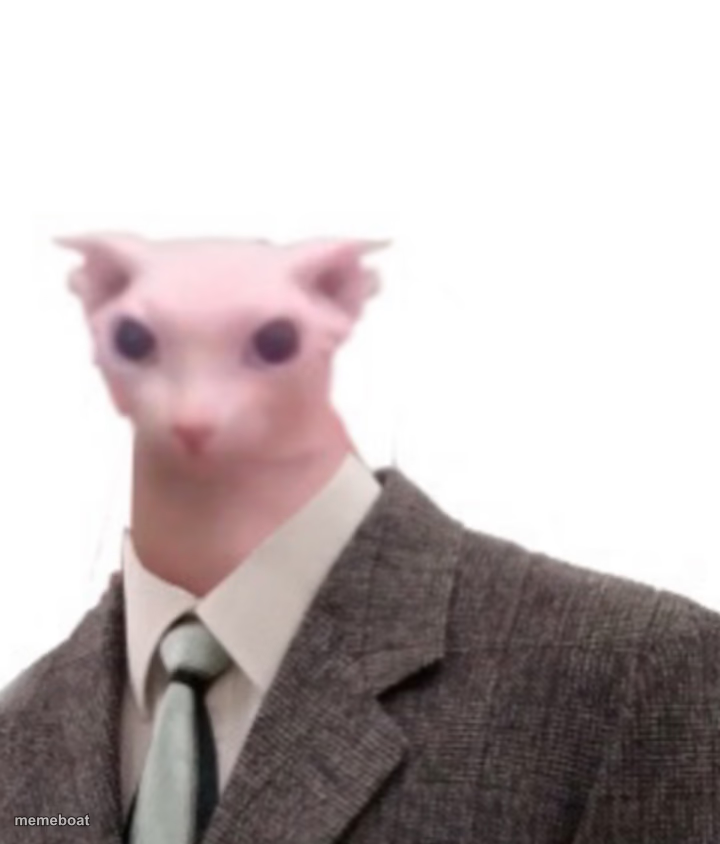
Bingus the hairless cat in a business suit stares blankly into your soul. Perfect for deadpan office jokes and corporate absurdity. Free to caption and download.
Blank bingus meme template
Download the blank bingus template to caption it yourself, or add your text right here in the editor above and download the finished meme.
When to use the bingus meme
- Reacting to a pointless meeting that could've been an email
- Captioning the face you make during performance reviews
- Any joke about corporate life sucking the soul out of you
bingus template facts
- Featuring
- Bingus (internet meme)
- Dimensions
- 720 × 844 px
- Format
- PNG
- Text boxes
- 2
- Added
- 2025
About the bingus meme template
Bingus doesn't blink, doesn't smile, and definitely doesn't care about your quarterly numbers. A hairless cat's blank stare crammed into a tweed suit and tie is somehow the most accurate portrait of middle management ever produced.
Use it for deadpan corporate humor, soulless meeting energy, or any joke that needs a face that has completely given up but still shows up to work on time.
Popular bingus caption ideas
when i get free candy in a van · busnees
me · pretending to care about synergy
HR when you ask for a raise · "let's circle back"
my will to live · at the 9am standup



bingus meme FAQ
How do I make a bingus meme?
Scroll up to the bingus template, type your caption into the 2 text boxes in the editor above, adjust the font, size and color if you like, then click download. Your finished bingus meme is ready to share in seconds.
Can I use the bingus template for free?
Yes. The bingus template is completely free to use — no signup and no limits on how many memes you create or where you share them.
How do I download my bingus meme?
Click the download button under the editor once your bingus meme looks right. It saves straight to your device as a high-quality PNG or JPEG image.
How do I download the blank bingus template?
Use the "Download blank template" button in the blank bingus template section above to save the original, un-captioned image — handy if you'd rather caption it in another app or keep a copy.