
BF Stupid Meme Generator
Create Your BF Stupid Meme

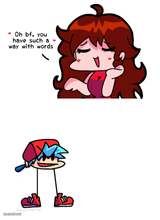
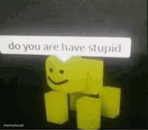
Blurry retro cartoon kid with wild blue spiky hair, a red cap, and a dopey drool-face. Caption it free for dumb-moment reactions.
Blank BF Stupid meme template
Download the blank BF Stupid template to caption it yourself, or add your text right here in the editor above and download the finished meme.
When to use the BF Stupid meme
- Watching someone explain crypto for the third time
- When the group project update is 'no progress'
- Seeing the price of literally anything in 2026
BF Stupid template facts
- Dimensions
- 288 × 288 px
- Format
- PNG
- Text boxes
- 2
- Added
- 2025
About the BF Stupid meme template
This one's a mystery deep-cut: a grainy, VHS-quality cartoon kid with electric blue spiky hair jammed under a red cap, eyes wide and mouth hanging open in a drool. Nobody's quite sure which old-school cartoon he crawled out of, but that half-melted, glitchy screengrab energy is exactly why he works as a reaction.
Use him whenever words fail and a slack-jawed stare is the only appropriate response. Drop your own caption on top and send him off free, no login required.
Popular BF Stupid caption ideas
ME WATCHING THE MEETING · COULD'VE BEEN AN EMAIL
BRAIN.EXE · HAS STOPPED RESPONDING
WHEN THEY SAY · "ONE MORE THING"


BF Stupid meme FAQ
How do I make a BF Stupid meme?
Scroll up to the BF Stupid template, type your caption into the 2 text boxes in the editor above, adjust the font, size and color if you like, then click download. Your finished BF Stupid meme is ready to share in seconds.
Can I use the BF Stupid template for free?
Yes. The BF Stupid template is completely free to use — no signup and no limits on how many memes you create or where you share them.
How do I download my BF Stupid meme?
Click the download button under the editor once your BF Stupid meme looks right. It saves straight to your device as a high-quality PNG or JPEG image.
How do I download the blank BF Stupid template?
Use the "Download blank template" button in the blank BF Stupid template section above to save the original, un-captioned image — handy if you'd rather caption it in another app or keep a copy.