
Bald Ksi Meme Generator
Create Your Bald Ksi Meme
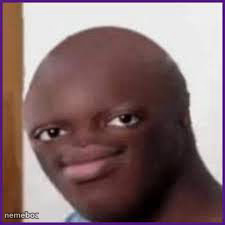
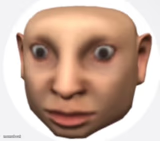
Bald edited reaction face of a smug, wide-eyed guy staring dead ahead. Perfect for petty disbelief or side-eye captions. Caption it free.
Blank Bald Ksi meme template
Download the blank Bald Ksi template to caption it yourself, or add your text right here in the editor above and download the finished meme.
When to use the Bald Ksi meme
- When someone tries to explain away an obvious excuse
- Reacting to a friend's terrible take with zero words
- The face you make when you already know they're lying
- Silently judging someone's life choices in real time
Bald Ksi template facts
- Dimensions
- 225 × 225 px
- Format
- JPG
- Text boxes
- 1
- Added
- 2025
About the Bald Ksi meme template
That flat stare, that smirk-not-quite-smirk, the hairless edit that makes the whole face just hit different. This is the Bald Ksi reaction template, the go-to face for when someone says something so dumb you can't even respond, you just look at them.
Use it for petty comebacks, quiet judgment, or that moment you catch a friend in an obvious lie. No context needed, the face does all the talking. Caption it, download it free, and drop it in the group chat.
Popular Bald Ksi caption ideas
you said what now
me pretending i believe you
that's cap and you know it
Templates similar to Bald Ksi



Bald Ksi meme FAQ
How do I make a Bald Ksi meme?
Scroll up to the Bald Ksi template, type your caption into the text box in the editor above, adjust the font, size and color if you like, then click download. Your finished Bald Ksi meme is ready to share in seconds.
Can I use the Bald Ksi template for free?
Yes. The Bald Ksi template is completely free to use — no signup and no limits on how many memes you create or where you share them.
How do I download my Bald Ksi meme?
Click the download button under the editor once your Bald Ksi meme looks right. It saves straight to your device as a high-quality PNG or JPEG image.
How do I download the blank Bald Ksi template?
Use the "Download blank template" button in the blank Bald Ksi template section above to save the original, un-captioned image — handy if you'd rather caption it in another app or keep a copy.