
Dog In Backpack Meme Generator
Create Your Dog In Backpack Meme
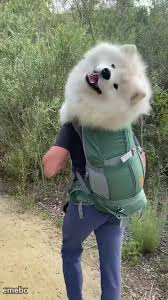
A fluffy white dog rides along in a backpack carrier on a hiking trail, head poking out mid-bark. Great for spoiled-pet jokes — caption it free.
Blank Dog In Backpack meme template
Download the blank Dog In Backpack template to caption it yourself, or add your text right here in the editor above and download the finished meme.
When to use the Dog In Backpack meme
- Pets who refuse to walk but demand to be included in the hike
- Letting someone else do all the work while you just enjoy the ride
- That friend who shows up to the group project already done nothing
Dog In Backpack template facts
- Dimensions
- 168 × 300 px
- Format
- JPG
- Text boxes
- 2
- Added
- 2025
About the Dog In Backpack meme template
A big fluffy white dog gets carried through the woods in a backpack pet carrier like the tiny royalty it clearly believes it is, mouth open mid-bark or mid-pant while its owner does all the actual walking.
Popular Dog In Backpack caption ideas
Me making my friend carry all the hiking gear · while I supervise
When you delegate the whole presentation · and still show up to take the credit
POV: you're the manager · on a 'team hike'
Templates similar to Dog In Backpack


Dog In Backpack meme FAQ
How do I make a Dog In Backpack meme?
Scroll up to the Dog In Backpack template, type your caption into the 2 text boxes in the editor above, adjust the font, size and color if you like, then click download. Your finished Dog In Backpack meme is ready to share in seconds.
Can I use the Dog In Backpack template for free?
Yes. The Dog In Backpack template is completely free to use — no signup and no limits on how many memes you create or where you share them.
How do I download my Dog In Backpack meme?
Click the download button under the editor once your Dog In Backpack meme looks right. It saves straight to your device as a high-quality PNG or JPEG image.
How do I download the blank Dog In Backpack template?
Use the "Download blank template" button in the blank Dog In Backpack template section above to save the original, un-captioned image — handy if you'd rather caption it in another app or keep a copy.