
Baby, Can You Touch Me Already Meme Generator
A manga-style illustration depicts a female character leaning over a male character from behind as he sits at a desk.
Create Your Baby, Can You Touch Me Already Meme
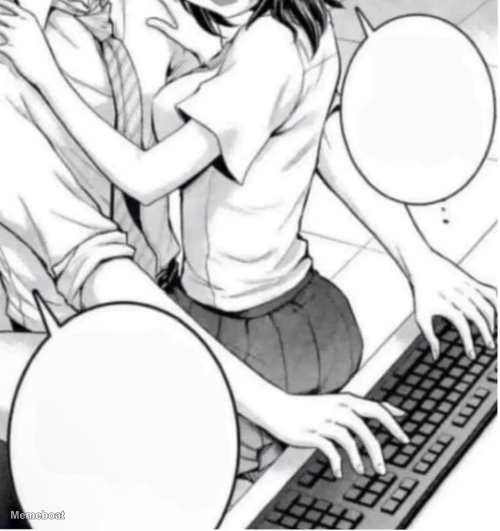
Blank Baby, Can You Touch Me Already meme template
Download the blank Baby, Can You Touch Me Already template to caption it yourself, or add your text right here in the editor above and download the finished meme.
Baby, Can You Touch Me Already template facts
- Dimensions
- 500 × 531 px
- Format
- WEBP
- Text boxes
- 2
- Added
- 2026
About the Baby, Can You Touch Me Already meme template
A manga-style illustration depicts a female character leaning over a male character from behind as he sits at a desk. Her arms are wrapped around him, and her hands are positioned on a computer keyboard, suggesting she is typing or playfully interfering. Their faces are close, implying an intimate or affectionate interaction. Two empty speech bubbles are present in the image. The setting appears to be an indoor environment.
Templates similar to Baby, Can You Touch Me Already

Baby, Can You Touch Me Already meme FAQ
How do I make a Baby, Can You Touch Me Already meme?
Scroll up to the Baby, Can You Touch Me Already template, type your caption into the 2 text boxes in the editor above, adjust the font, size and color if you like, then click download. Your finished Baby, Can You Touch Me Already meme is ready to share in seconds.
Can I use the Baby, Can You Touch Me Already template for free?
Yes. The Baby, Can You Touch Me Already template is completely free to use — no signup and no limits on how many memes you create or where you share them.
How do I download my Baby, Can You Touch Me Already meme?
Click the download button under the editor once your Baby, Can You Touch Me Already meme looks right. It saves straight to your device as a high-quality PNG or JPEG image.
How do I download the blank Baby, Can You Touch Me Already template?
Use the "Download blank template" button in the blank Baby, Can You Touch Me Already template section above to save the original, un-captioned image — handy if you'd rather caption it in another app or keep a copy.