
Self-Portrait Expectation Vs Reality Meme Generator
Create Your Self-Portrait Expectation Vs Reality Meme
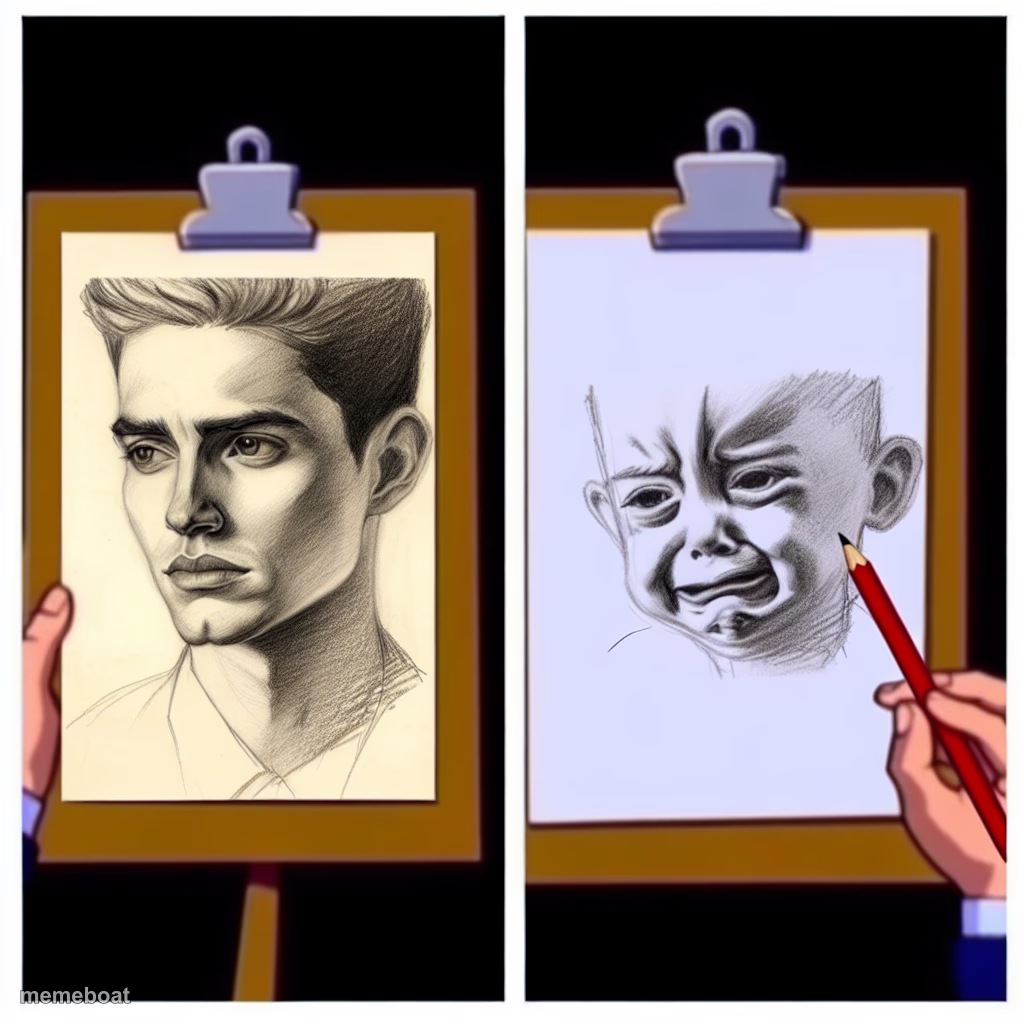
Two easels, two very different self-portraits: a chiseled dream face vs a crying baby-looking mess. Caption your own expectation vs reality moments free.
Blank Self-Portrait Expectation Vs Reality meme template
Download the blank Self-Portrait Expectation Vs Reality template to caption it yourself, or add your text right here in the editor above and download the finished meme.
When to use the Self-Portrait Expectation Vs Reality meme
- How you picture your gym progress vs the mirror
- Your LinkedIn headshot vs your passport photo
- The recipe photo vs what you actually cooked
Self-Portrait Expectation Vs Reality template facts
- Dimensions
- 1024 × 1024 px
- Format
- PNG
- Text boxes
- 2
- Added
- 2025
About the Self-Portrait Expectation Vs Reality meme template
The Art Tutorials meme template has become a beloved staple in internet culture, capturing the humorous frustrations and unexpected outcomes of following online art lessons. Emerging around the late 2010s on platforms like Reddit and Instagram, this meme quickly turned into a viral phenomenon, resonating with artists and casual creators alike. Its relatable depiction of the gap between tutorial expectations and real-life results highlights the comedic side of learning and creativity, making it a perfect example of meme culture’s ability to connect through shared experiences.
Knowing how to use the Art Tutorials meme effectively can elevate your social media content by tapping into relatable moments of trial and error. This template is perfect for illustrating funny reactions to artistic mishaps, beginner struggles, or exaggerated learning curves. Whether you’re posting on Instagram, Twitter, or TikTok, knowing when to share this meme—such as during art challenges or creative fails—can maximize engagement. Users searching for how to make Art Tutorials memes will find this template ideal for expressing humor around the creative process and connecting with audiences who appreciate comedy rooted in everyday digital culture.
The Art Tutorials meme remains popular because it’s easy to customize and instantly relatable, making it a top choice for meme makers looking to generate viral content quickly. With our free online generator, anyone can create personalized Art Tutorials memes without design skills, adding custom text to capture unique comedic twists. Its shareable nature boosts social media engagement, encouraging laughs and shares across Facebook, Instagram, and Twitter. Don’t miss out—start creating your own Art Tutorials meme now and join millions who use this trending template to build funny, viral entertainment content effortlessly.
Popular Self-Portrait Expectation Vs Reality caption ideas
YOUTUBE TUTORIAL RESULTS · YOUTUBE TUTORIAL EXPECTATION
WHAT I THINK I LOOK LIKE · WHAT THE CAMERA SEES
MY FIVE YEAR PLAN · MY ACTUAL BANK ACCOUNT
HOW I EXPLAIN THE PROJECT IN THE MEETING · WHAT I ACTUALLY BUILT
Templates similar to Self-Portrait Expectation Vs Reality
Self-Portrait Expectation Vs Reality meme FAQ
How do I make a Self-Portrait Expectation Vs Reality meme?
Scroll up to the Self-Portrait Expectation Vs Reality template, type your caption into the 2 text boxes in the editor above, adjust the font, size and color if you like, then click download. Your finished Self-Portrait Expectation Vs Reality meme is ready to share in seconds.
Can I use the Self-Portrait Expectation Vs Reality template for free?
Yes. The Self-Portrait Expectation Vs Reality template is completely free to use — no signup and no limits on how many memes you create or where you share them.
How do I download my Self-Portrait Expectation Vs Reality meme?
Click the download button under the editor once your Self-Portrait Expectation Vs Reality meme looks right. It saves straight to your device as a high-quality PNG or JPEG image.
How do I download the blank Self-Portrait Expectation Vs Reality template?
Use the "Download blank template" button in the blank Self-Portrait Expectation Vs Reality template section above to save the original, un-captioned image — handy if you'd rather caption it in another app or keep a copy.