
Architecture of a Neural Network Meme Generator
A clear diagram illustrating the architecture of a feedforward neural network.
Create Your Architecture of a Neural Network Meme
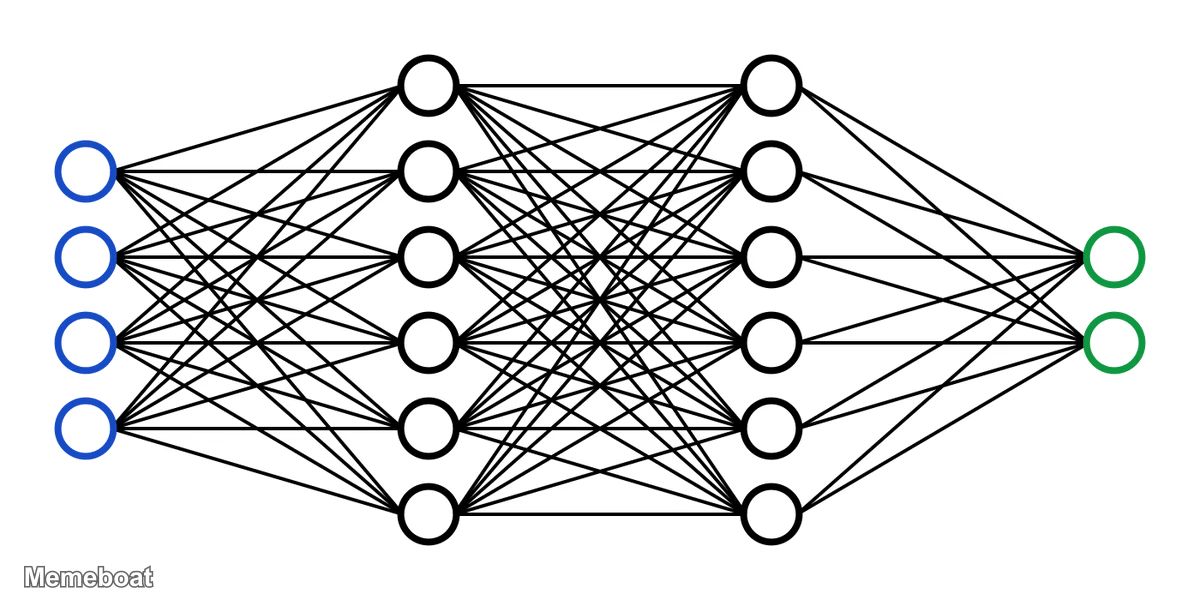
Blank Architecture of a Neural Network meme template
Download the blank Architecture of a Neural Network template to caption it yourself, or add your text right here in the editor above and download the finished meme.
Architecture of a Neural Network template facts
- Dimensions
- 1200 × 600 px
- Format
- WEBP
- Text boxes
- 2
- Added
- 2026
About the Architecture of a Neural Network meme template
A clear diagram illustrating the architecture of a feedforward neural network. It displays four input nodes with blue borders on the left, two hidden layers each containing five nodes with black borders in the middle, and two output nodes with green borders on the right, all interconnected by lines representing weighted connections.
Popular Architecture of a Neural Network caption ideas
this is the egirl that likes your posts
when @basedkuromiboi likes my post
Templates similar to Architecture of a Neural Network


Architecture of a Neural Network meme FAQ
How do I make a Architecture of a Neural Network meme?
Scroll up to the Architecture of a Neural Network template, type your caption into the 2 text boxes in the editor above, adjust the font, size and color if you like, then click download. Your finished Architecture of a Neural Network meme is ready to share in seconds.
Can I use the Architecture of a Neural Network template for free?
Yes. The Architecture of a Neural Network template is completely free to use — no signup and no limits on how many memes you create or where you share them.
How do I download my Architecture of a Neural Network meme?
Click the download button under the editor once your Architecture of a Neural Network meme looks right. It saves straight to your device as a high-quality PNG or JPEG image.
How do I download the blank Architecture of a Neural Network template?
Use the "Download blank template" button in the blank Architecture of a Neural Network template section above to save the original, un-captioned image — handy if you'd rather caption it in another app or keep a copy.