
669 points Meme Generator
Create Your 669 points Meme
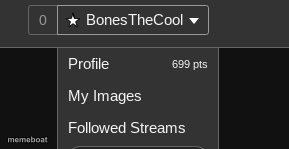
A screenshot of a site profile dropdown showing points and menu options — a plain UI capture, but caption it and download free anyway.
Blank 669 points meme template
Download the blank 669 points template to caption it yourself, or add your text right here in the editor above and download the finished meme.
When to use the 669 points meme
- Bragging about meaningless internet points
- Checking your karma obsessively
- The dopamine hit of a notification that means nothing
- Flexing stats nobody else cares about
669 points template facts
- Dimensions
- 289 × 149 px
- Format
- PNG
- Text boxes
- 1
- Added
- 2025
About the 669 points meme template
This one's just a cropped screenshot of a website's account dropdown menu — points total, profile link, followed streams. Not exactly a meme in the traditional sense, but it's been used as a stand-in for "look how many points/clout I have" jokes.
Honestly the humor here is bring-your-own-context: caption it to mock internet points, imaginary internet fame, or your own inflated sense of online achievement.
Popular 669 points caption ideas
Me checking my karma for the 4th time today
699 points and still can't pay rent
My entire personality right now
669 points meme FAQ
How do I make a 669 points meme?
Scroll up to the 669 points template, type your caption into the text box in the editor above, adjust the font, size and color if you like, then click download. Your finished 669 points meme is ready to share in seconds.
Can I use the 669 points template for free?
Yes. The 669 points template is completely free to use — no signup and no limits on how many memes you create or where you share them.
How do I download my 669 points meme?
Click the download button under the editor once your 669 points meme looks right. It saves straight to your device as a high-quality PNG or JPEG image.
How do I download the blank 669 points template?
Use the "Download blank template" button in the blank 669 points template section above to save the original, un-captioned image — handy if you'd rather caption it in another app or keep a copy.