
2025 Meme Generator
Create Your 2025 Meme
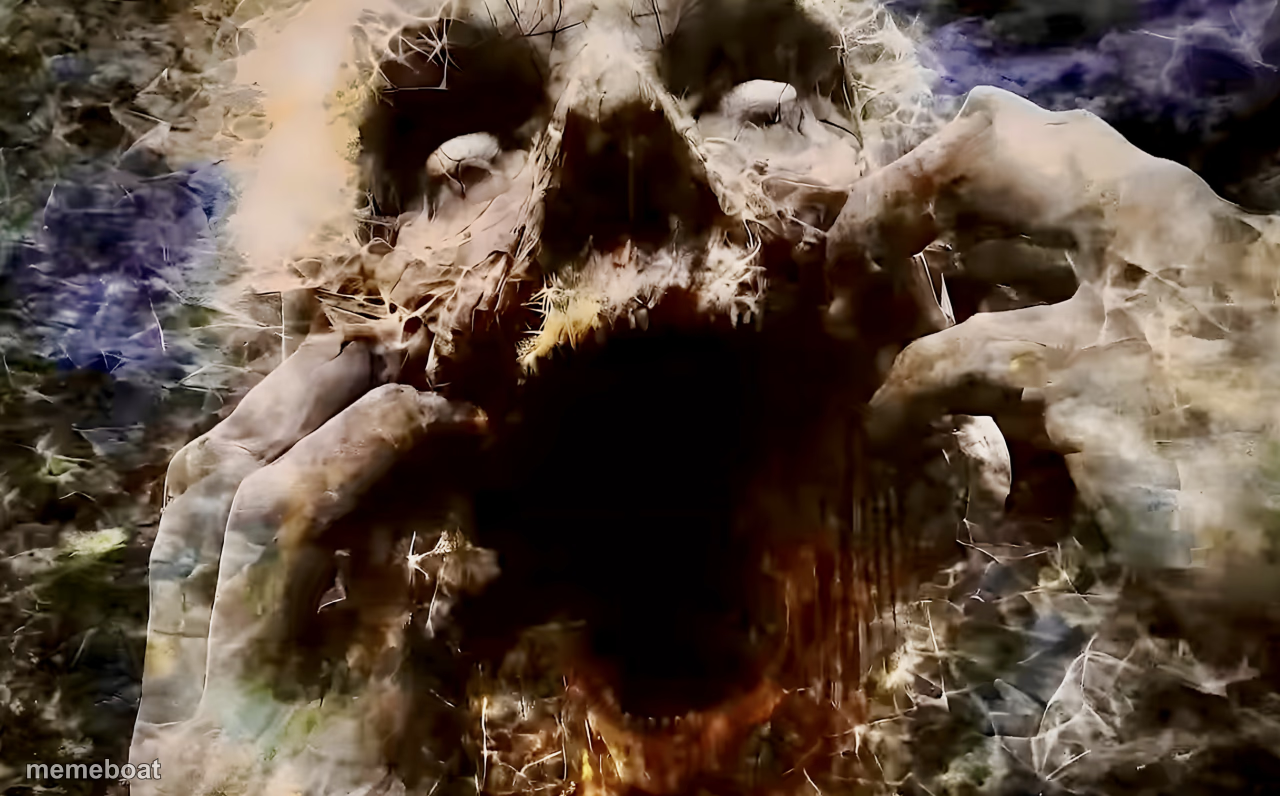
A terrifying screaming ghoul face with skeletal hands reaching out of darkness — perfect for horror memes and jump-scare captions. Caption it free.
Blank 2025 meme template
Download the blank 2025 template to caption it yourself, or add your text right here in the editor above and download the finished meme.
When to use the 2025 meme
- when you open your inbox on a Monday morning
- the sound your group chat makes at 3am
- your face reacting to the electric bill
2025 template facts
- Dimensions
- 1280 × 796 px
- Format
- JPG
- Text boxes
- 2
- Added
- 2025
About the 2025 meme template
This one is nightmare fuel: a decayed, screaming face erupts from a swirl of shadow and static, bony hands clawing forward like it's about to leap through the screen. It's the kind of image that belongs in a found-footage horror movie or a cursed chain email from 2003.
Use it for anything that deserves a full-body flinch reaction — Mondays, group projects, that one notification sound, or the moment you realize you replied-all. It's unsettling, it's a little glitchy, and it's exactly the energy some captions need.
Popular 2025 caption ideas
ME OPENING MY BANK APP · AFTER PAYDAY WEEKEND
WHEN THE WIFI DROPS · MID BOSS FIGHT
THAT ONE NOTIFICATION SOUND · AT 3 AM
Templates similar to 2025


2025 meme FAQ
How do I make a 2025 meme?
Scroll up to the 2025 template, type your caption into the 2 text boxes in the editor above, adjust the font, size and color if you like, then click download. Your finished 2025 meme is ready to share in seconds.
Can I use the 2025 template for free?
Yes. The 2025 template is completely free to use — no signup and no limits on how many memes you create or where you share them.
How do I download my 2025 meme?
Click the download button under the editor once your 2025 meme looks right. It saves straight to your device as a high-quality PNG or JPEG image.
How do I download the blank 2025 template?
Use the "Download blank template" button in the blank 2025 template section above to save the original, un-captioned image — handy if you'd rather caption it in another app or keep a copy.