
10 guy bad pun Meme Generator
Create Your 10 guy bad pun Meme

Create 10 guy bad pun memes with custom text. Perfect for wordplay jokes and misunderstanding humor. Add your captions and download instantly.
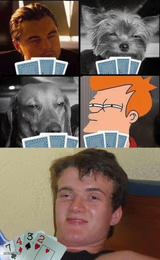
Blank 10 guy bad pun meme template
Download the blank 10 guy bad pun template to caption it yourself, or add your text right here in the editor above and download the finished meme.
10 guy bad pun template facts
- Dimensions
- 500 × 1124 px
- Format
- JPG
- Added
- 2026
About the 10 guy bad pun meme template
Start with a setup that sounds like one thing, then reveal the punchline twist in your final caption. The 10 guy bad pun format works best when the misunderstanding feels natural and catches readers off guard.
This template fits situations where someone mishears or misinterprets something in a humorous way. The three-panel structure lets you build up the scenario in the first two captions, then deliver the comedic revelation in the third. Focus on wordplay that creates genuine confusion between two similar-sounding phrases or concepts.
Popular 10 guy bad pun caption ideas
A very friendly cop gave me a ticket today · He kept saying “Hi, how are you?” · Or maybe it was “How high are you?”
Templates similar to 10 guy bad pun





10 guy bad pun meme FAQ
How do I make a 10 guy bad pun meme?
Scroll up to the 10 guy bad pun template, add your own text boxes in the editor above and type your captions, adjust the font, size and color if you like, then click download. Your finished 10 guy bad pun meme is ready to share in seconds.
Can I use the 10 guy bad pun template for free?
Yes. The 10 guy bad pun template is completely free to use — no signup and no limits on how many memes you create or where you share them.
How do I download my 10 guy bad pun meme?
Click the download button under the editor once your 10 guy bad pun meme looks right. It saves straight to your device as a high-quality PNG or JPEG image.
How do I download the blank 10 guy bad pun template?
Use the "Download blank template" button in the blank 10 guy bad pun template section above to save the original, un-captioned image — handy if you'd rather caption it in another app or keep a copy.